
Development Environment

Before Anything Else
For my retro computing projects I wanted to experiment with classic 8 bit processors and their support devices and see if I could design my own circuits to add enhanced graphic and sound capabilities. I could have done this using actual CPUs, support devices and TTL logic and wired them up to make the final machine. I might still do this at some point but this approach takes a lot of time to source devices and solder them all together. Having worked with FPGAs for years I decided to design the circuits I needed using the Verilog hardware description language and implement these in low cost FPGA boards.
FPGA Development Boards
A few years back I bought a relatively inexpensive Terasic systems DE0 Nano board for around £100. This features an Altera Cyclone IV device with 22,320 logic elements and 594 kbits of embedded memory, which is a resonable size for 8 bit development. The DE0 has some extra memory components along with a couple of switches, some LEDs and several GPIOs exposed on IDC headers. Full details can be found here.
The DE0 is my main development board which I have used exclusively so far. I also have a cheaper EP2C5 board with an smaller Altera Cyclone II device. This should be able to fit a small 8 bit system. In addition I have a Tang nano 9K board. Both of these boards are available via AliExpress or eBay for £20 or so.
Adding VGA Output
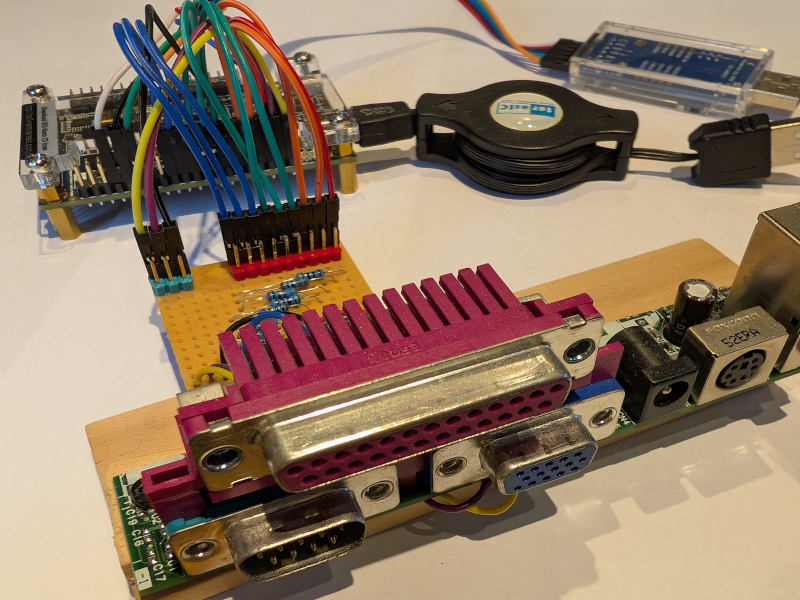
An 8 bit computer system wouldn't be much fun without an graphics display so I have built a small circuit to connect the DE0 Nano to a VGA monitor. This circuit reuses a VGA connector salvaged from an old PC wired up to three resistor ladders to convert 3 digital bits of information into 8 analogue levels for each RGB channel giving a total of 512 colours. These per pixel digital values along with horizontal and vertical sync signals are connnected by headers to GPIO pins on the DE0 FPGA board. Logic in the DE0 generates the sync signals and sends out the per pixel data to generate a VGA image.
Virtual Linux Machine
To develop Verilog based 8 bit systems I would need to install a Verilog simulation tool and an FPGA synthesis tool. For synthesis Altera Quartus II is the obvious choice and various free versions of Modelsim are available for simulation. Searching around showed that Arch Linux had prebuilt packages for these tools (including older versions of Quartus to support the Cyclone II board) with comprehensive installation guides. However Arch Linux is not trivial to install so I opted for Manjaro which can use the Arch repositories. To keep this self contained and seperate from my main work computer I used Virtmanager to create a Manjaro virtual machine.
Altera Quartus II
To keep the option of using the Cyclone II based FPGA board an older version of Quartus II is needed. The Arch repository has a package 'quartus-130' which enables installation of Quartus II 13.0sp1.
To install follow the Arch wiki guidelines here.
Some useful points worth mentioning :-
-
I needed to install 4 extra packages to complete the process, all are in the AUR repositories. lib32_freetype lib32_fontconfig lib32_libpng12 libpng12
-
A license for Quartus is needed and can be obtained by going to the Intel site and registering. It's totally free for the this version. Remember that if you use a virtual machine the MAC address is the virtual machine MAC address and not the host machine address.
-
I needed to create a dummy eth0 port on my virtual machine so that Quartus can find the license key - this is explained in the Arch wiki.
-
The Altera USB blaster needs to be on a main USB port not a hub and then can be re-directed to the virtual machine.
-
I found Quartus II to be unstable and it would often fail to route designs whilst using lots of CPU cycles and memory. Fortunately others have experienced these problems and have come up with a solution. These two links explain the problem :-
-
After reading through the above links I did the following to fix the issue :-
- Create a temp directory
- wget https://vault.centos.org/7.5.1804/os/x86_64/Packages/tbb-4.1-9.20130314.el7.x86_64.rpm
- bsdtar -xf tbb-4.1-9.20130314.el7.x86_64.rpm
- Then find 3 files, libtbbmalloc-proxy.so.2, libtbbmalloc.so.2, libtbb.so.2
- Copy these on top of the Altera Quartus versions which were located in /opt/altera130/quartus/linux64 on my install.
-
This solves the issue and Quartus runs reliably now. Thanks to Retro Ramblings and zkrs. Reproducing here to spread the knowledge.
Modelsim Simulation
There is a license free relatively modern version of Modelsim in the Arch repositories, 'modelsim-intel-starter'. This was straightforward to install and if it is limited in some way then that doesn't appear to be an issue for any of my retro designs currently.