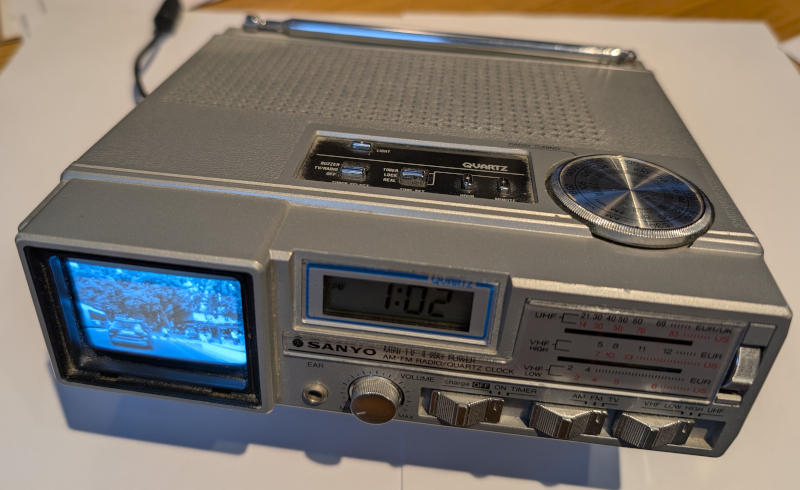
TV Clock Radio Video Player

TV Clock Radio Video Player
I've always been fascinated with these devices. They take the humble bedside clock radio to the next level by adding a small black and white CRT screen to allow you to wake up to Roland Rat on TVAM. Back in the day you would have had to live in a strong signal area to receive much on the analogue VHF/UHF tuner and since the analogue TV switch off there is nothing to receive and hence view on these devices.
I have a few of these TV clock radios and a couple from Sanyo which are particulary small and neat. I wanted the one I keep on my workdesk to do something other than look interesting and so I decided to see if there was a simple way to get video onto the screen.
Generating Video
In order to display something interesting a composite video source is first needed. The obvious choice for this task is a small single board computer. The Raspberry PI Zero is very compact and can generate a composite video output directly from headers on the PCB and I had a few of these lying around. I wanted the Raspberry PI system to be self contained without the need for a network connection or keyboard or mouse input and to start up automatically on power up, simply cycling through videos stored on the same SD card as the operating system. Fortunately this is a requirement that several people have had previously and so there are a range of 'video kiosk/player' programs to choose from. I settled on the 'Raspberry PI Video Looper' code which is a self contained operating system and code put together by Christian Sievers, that simply boots and plays videos automatically. It can be found here.
Getting Video In
Sometimes you get luckily and the the CRT device you want to drive will have a composite video input which is easy to generate. But most of the time that isn't the case and in particular these TV Clock Radios were intended to be self contained and so often just use simple telescopic aerials to receive the broadcast signals. Sometimes an exteral aerial connection is available and this would allow video to be sent to the device by modulating the video signal onto VHF/UHF frequencies. However this approach would require an exteral modulator and will not give the best picture quality.
Internally the UHF broadcast signal will be demodulated down to a baseband video signal, usually 1V or so peak to peak and this will be exposed at some point on the PCB. To inject a video signal it is necessary to identify a suitable point on the PCB where the video signal is present. A track should be broken on the PCB to disconnect the video signal from the tuner and then a connection made at this point to feed in the video signal from the external video source.
In my case this was made a lot easier by the fact that I was able to download the service manual for my particular TV Clock Radio, a Sanyo TPM2770. The service manaual had a lot of useful information including a block diagram that identified where the video signal could be found.

For other makes and models the best approach is to try and find the service manual first. If this fails a visual inspection of the PCB can often help. Devices like these frequently have just one large video processing IC which will process the video signal from the tuner and so are a good point to start from. The part number of the IC might also reveal its function and pin out which can help. Otherwise it is a question of trial and error, tracing the signal path from the UHF/VHF tuners (which are usually self contained silver metal boxes) through various blocks before getting to the CRT tube itself to try and find a suitable point to break the path and inject the external video signal.
In my case with the aid of the block diagram I quickly found a suitable point on the PCB and it was just a question of soldering in the external video signal from the Raspberry PI Zero and cutting one track to isolate the path from the tuners.

To complete the installation I also picked up ground and the 9V input from the power jack. The 9V power input was fed into a DC-DC converter to generate the 5V the Raspberry PI Zero needs to operate. The connections from the PI to the TV are routed thorough a hole in the battery compartment. I have recently aquired a 3D printer so I plan to make up some mounting plates to tidy up the current arrangement which is a bit of a mess, with the voltage converter and Raspberry PI being held in place with insulation tape!
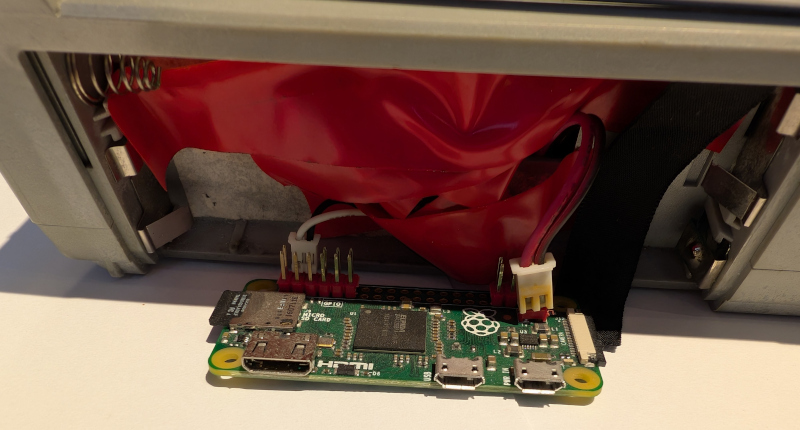
The Finished Article
My customized TV Clock Radio has been sat on my desk playing videos every day for a couple of years now. I use it to add a bit of visual interest and for me the best videos have turned out to be videos of trips through cities. These have enough visual interest to distract briefly but not too much to demand constant attention.